.svg)


Introduction
Localization is no longer optional for businesses targeting global audiences. Serving content in a user's native language dramatically improves engagement, conversion rates, and trust.
Webflow has invested heavily in localization capabilities — but the right approach depends on your project's complexity and budget. This guide breaks down your options based on what actually works in practice.

Why Localization Matters for Your Webflow Site
The Business Case for Multilingual Websites
Research consistently shows that users are more likely to purchase when websites speak their native language — even when they're competent in English. For SaaS, e-commerce, and service businesses targeting non-English markets, localization often delivers some of the highest ROI of any marketing investment.
What Good Localization Involves
True localization goes beyond translation. It includes adapting images, date formats, currencies, units of measurement, and cultural references to feel native to each market. The best localized sites don't feel like translations — they feel built for that audience.
Option 1: Webflow Native Localization
What It Is
Webflow launched its native Localization feature in 2023. It allows you to create alternate locales directly within the Webflow Designer, translate both static and CMS content, and serve different language versions from the same project with proper hreflang support.
Pros and Cons
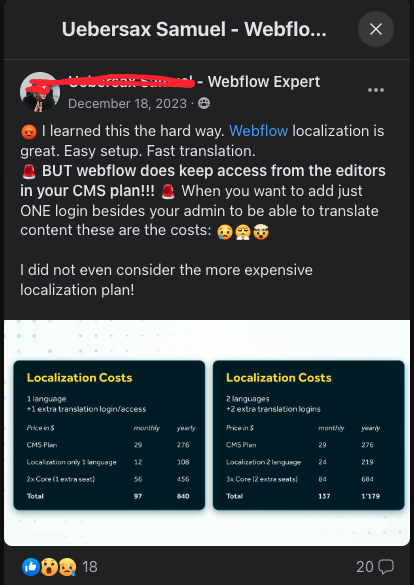
It's a powerful option for teams already in the Webflow ecosystem. The main limitation is cost — native localization requires a higher-tier Webflow plan and is priced per locale. For teams managing 5+ locales, costs can add up quickly.
Best for: Teams fully committed to the Webflow ecosystem with budget for per-locale pricing. Ideal when you want full control inside the same Webflow project without third-party dependencies.
Option 2: Weglot
What It Is
Weglot is the most popular third-party localization tool for Webflow. It auto-translates your site using machine translation and allows human editors to refine translations in a dedicated dashboard. Setup involves adding a Weglot script to Webflow's custom code.
Pros and Cons
Weglot is fast to implement and handles both static and CMS content well. Pricing is subscription-based per language — generally more affordable than Webflow's per-locale pricing for multi-language sites. The main downside is the dependency on a third-party script.
Best for: Fast implementation with good machine translation and easy human editing. Ideal for teams who want localization without deep technical setup or design workflow changes.

Option 3: Localize.js
What It Is
Localize.js is a developer-friendly localization tool that integrates via JavaScript. It gives teams more control over translation management and workflow compared to fully automated solutions, making it preferred by teams with in-house translation capacity and editorial process requirements.
Pros and Cons
More flexibility and control than Weglot, but requires more technical setup. Better suited to organizations with dedicated localization workflows, translation memory requirements, or enterprise translation management systems.
Best for: Developer-led teams who want granular workflow control and prefer to manage translations through their own editorial and QA process.

Option 4: Manual Multi-Language Setup
What It Is
Some teams build separate Webflow pages or separate Webflow projects for each language. This gives maximum design control per locale and zero dependency on third-party tools, but significantly increases maintenance overhead.
When It Makes Sense
This approach is best for projects with very specific design requirements per locale — for example, an entirely different layout for Japanese vs. English audiences. It works well with small language sets (2–3 locales) and teams with the bandwidth to maintain separate content structures.
Best for: Highly customized locale-specific designs with a small number of languages and a team willing to maintain parallel content structures long-term.
How to Choose the Right Localization Method
Decision Framework
Your choice should depend on three factors: budget, team capacity, and design control requirements.
- Webflow Native Localization — Best if you want everything inside Webflow with no third-party tools and have budget for per-locale pricing
- Weglot — Best for fast implementation, multi-language sites on a budget, and machine translation with human review
- Localize.js — Best for developer-led teams with enterprise translation workflow requirements
- Manual setup — Best for highly customized locale-specific designs with a small number of languages
For international businesses also considering how to reach Chinese users, see our guide on whether Webflow websites work in China. For broader SEO implications of multilingual sites, see our Webflow SEO guide.

Conclusion
Localizing your Webflow site is one of the most impactful ways to expand your global reach. Whether you use Webflow's native localization or a third-party tool like Weglot, the right choice depends on your team's capacity, budget, and localization scope.
Start with the solution that fits your current scale — you can always upgrade as your needs grow. Our Webflow development team can help you architect the right localization solution for your specific requirements. Talk to us →





